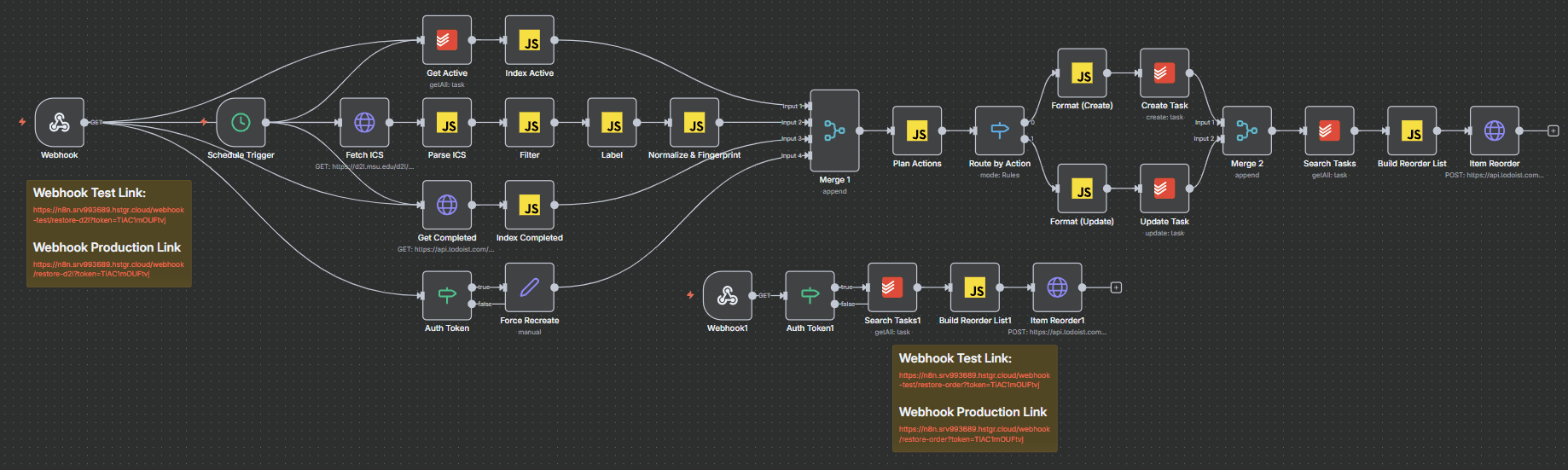
What I Built
This project is a fully automated system that connects my D2L calendar to the task app I use on my phone. Instead of manually checking each class for due dates, quizzes, and exams, everything is automatically collected and added to my personal to-do list.
The workflow runs on a schedule, pulls calendar data, filters out relevant assignments, and creates tasks with due dates and useful links — all without any manual input.
For reference, the full workflow JSON is available below to view or download.
Why I Made It
I found it frustrating to constantly check multiple classes just to make sure I wasn’t missing anything important. Even though all the information existed in D2L, it wasn’t organized in a way that worked well for how I plan my time.
I wanted a system where everything I needed to do simply appeared in one place — automatically — so I could focus on actually getting work done instead of tracking it.
Key Challenge
The hardest part of this project was making the system reliable over time.
A naive version would continuously create duplicate tasks every time the workflow ran, especially after marking items as complete on my phone. Solving this required designing a way for the system to recognize what had already been created, updated, or finished so that it stayed clean and accurate.
How It Works (High Level)
- Pulls calendar data directly from D2L
- Extracts assignments, quizzes, and exams
- Filters and formats them into clean tasks
- Syncs them to my task app with due dates and links
- Keeps everything updated without creating duplicates
The result is a system that stays out of the way but quietly keeps everything organized.
Workflow JSON
You can inspect or download the exact n8n workflow file:
To use it in n8n, import the downloaded JSON into a new workflow and then update credentials for your own accounts.